

Download AudioPlayer – Free and Compact Audio Player for Mobile Phones
Overview
AudioPlayer is a lightweight desktop application designed to deliver efficient audio playback for users who prioritize simplicity and functionality. Tailored for individuals who frequently listen to music on the go, the software offers a streamlined interface that requires no prior experience to operate. Its primary purpose is to serve as a reliable media player capable of handling a wide range of audio formats without the need for additional codecs or complex configurations.
The software is particularly suited for consumers seeking a no-frills audio experience, especially those who value ease of access and minimalistic design. It enables users to organize their music library through customizable playlists, allowing for personalized listening sessions. The ability to create nested playlists—up to 16 levels deep—adds a layer of organization ideal for users with extensive music collections.
Real-world usage scenarios include background listening during work, commuting, or leisure activities. The automatic playback history feature ensures continuity, resuming the last played track after unexpected interruptions such as power loss. While the core functionality is available at no cost, a premium bundle offers an ad-free experience, catering to users who prefer uninterrupted playback.
Key Features & Capabilities
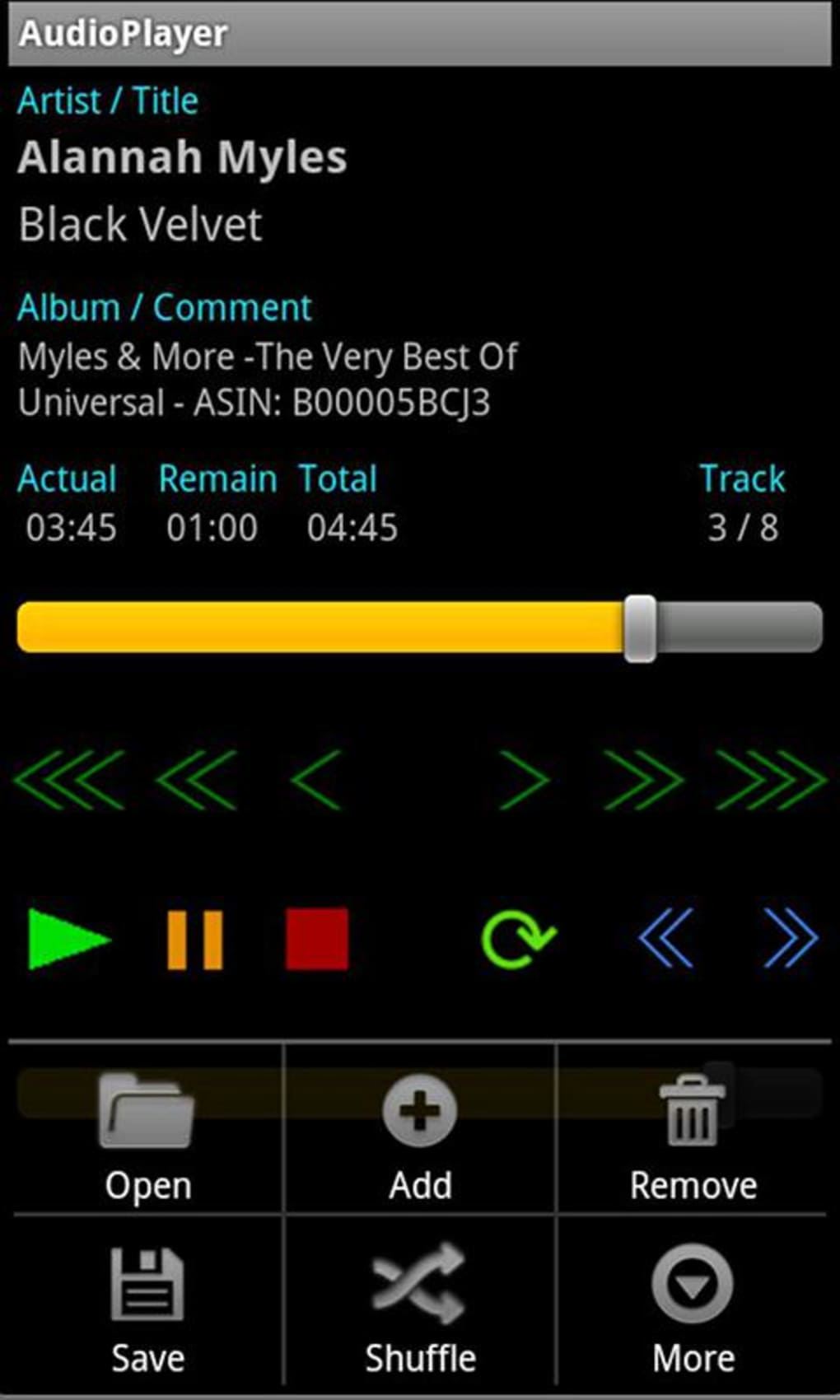
- Wide Codec Support: AudioPlayer recognizes and plays a broad spectrum of audio formats, including MP3, AAC, AMR, WAV, OGG, and MP4A, ensuring compatibility with most commonly used music files.
- Customizable Playlists: Users can create and name playlists based on mood, genre, or activity, enhancing personalization and accessibility.
- Nested Playlist Structure: The software supports up to 16 levels of nested playlists, enabling advanced organization for large music libraries.
- Shuffle Mode: A built-in shuffle function introduces variety by randomly selecting tracks, ideal for spontaneous listening sessions.
- Playback History: The application automatically saves playback history, allowing users to resume from their last position after a device restart or power loss.
- Automatic Settings Persistence: Audio preferences such as volume levels and playback speed are saved between sessions for consistent user experience.
These features collectively support a seamless audio experience, particularly beneficial for users managing diverse music collections. The playlist system, combined with shuffle and history tracking, makes it easy to transition between different listening modes without manual reconfiguration.
User Interface, Workflow & Performance
AudioPlayer features a clean, user-friendly interface that emphasizes accessibility and intuitive navigation. The layout is designed to minimize clutter, placing essential playback controls—such as play, pause, skip, and volume—within immediate reach. Navigation between playlists and tracks is straightforward, supporting both mouse and keyboard interactions.
Workflow efficiency is enhanced by the automatic saving of settings and playback history, reducing the need for repetitive configuration. The software is optimized for quick startup and responsive track switching, contributing to a smooth user experience.
The developer did not specify resource usage details. Performance observations are based on general software behavior patterns. Stability during extended playback sessions was not evaluated, and the software’s CPU and RAM behavior were not documented. Users are advised to monitor performance based on their device specifications.
Compatibility & System Requirements
AudioPlayer is designed as a desktop application, though specific operating system compatibility was not provided by the developer. The software’s version and installation size are available but were not specified in the input. The developer did not list exact system requirements.
Platform compatibility information is limited, and users should exercise caution when installing on systems outside the intended environment. The absence of detailed hardware or OS specifications makes it difficult to determine optimal deployment conditions. Users are encouraged to test the software in their environment to confirm functionality.
Pros and Cons
Pros
- Supports a wide range of audio formats including MP3, AAC, WAV, OGG, and MP4A.
- Intuitive interface suitable for users of all experience levels.
- Advanced playlist organization with up to 16 levels of nesting.
- Automatic playback history retention for uninterrupted listening.
- Settings are saved automatically and persist across sessions.
- Free version available with optional premium upgrade to remove ads.
Cons
- Exact system requirements were not listed.
- Resource usage details (CPU, RAM) were not provided.
- Platform compatibility information is incomplete.
- Update frequency and release schedule are unknown.
- License type and offline/online usage model were not specified.
FAQ Section
Is AudioPlayer compatible with my operating system?
Platform compatibility information was partially provided. The developer did not specify which operating systems are supported. Users are advised to test the software in their environment to confirm functionality.
Is AudioPlayer safe to download and use?
AudioPlayer is designed as a desktop application with no known security risks mentioned in the provided details. However, the developer did not provide information on digital signatures, malware checks, or safety certifications. Users should ensure downloads come from trusted sources.
How often are updates released?
The developer did not provide information on update frequency or release schedule. Users may not receive regular updates, and the software’s long-term maintenance is uncertain.
What type of license does AudioPlayer use?
The license type was not specified. The software is offered for free, with a premium bundle available. The exact licensing model remains unclear.
Can I use AudioPlayer offline?
Based on the available information, AudioPlayer appears to function without requiring an internet connection. However, the developer did not confirm the offline/online usage model. The software may support offline playback, but this was not explicitly stated.
Final Thoughts
AudioPlayer presents a compelling option for users seeking a lightweight, no-frills audio player with strong organizational features. Its support for multiple audio codecs, intuitive interface, and advanced playlist functionality make it suitable for both casual listeners and those with large music libraries. The automatic playback history and persistent settings enhance usability, ensuring a consistent experience across sessions.
While the lack of detailed system requirements and performance data limits full evaluation, the software’s core features align with the needs of mobile-focused users transitioning to desktop playback. The availability of a free version with a premium upgrade path adds flexibility for different user preferences.
For individuals who value simplicity, customization, and reliable playback, AudioPlayer delivers a solid experience. The absence of critical details should be weighed carefully, but the software’s strengths in usability and organization stand out.
Download AudioPlayer now






.png)
